In short: The LTO tracker lets you check your plate status online in minutes. You only need your plate number or MV file number ready. This guide shows the exact steps, alternative methods, and delivery options.
Key Takeaways
- Identify your plate type first, because each type uses a different inquiry tool.
- The online tracker mainly covers vehicles registered under LTO NCR offices.
- Strip leading zeros from your MV file number or the search returns nothing.
- Screenshot every result, since LTO counter staff often ask for proof.
- Dealers receive release notices first, so follow up with yours regularly.
What Is the LTO Tracker?
The LTO tracker is a set of online inquiry tools for plate status. These tools are maintained by LTO-NCR for Metro Manila vehicle records. Each tool matches a specific plate situation, so choosing correctly matters.
Most Filipino drivers use the tracker while waiting for new plates. Replacement plate owners also check whether their green-to-white plate is ready. Motorcycle owners with backlog plates rely on the MV file lookup.
Find the Right Inquiry Tool
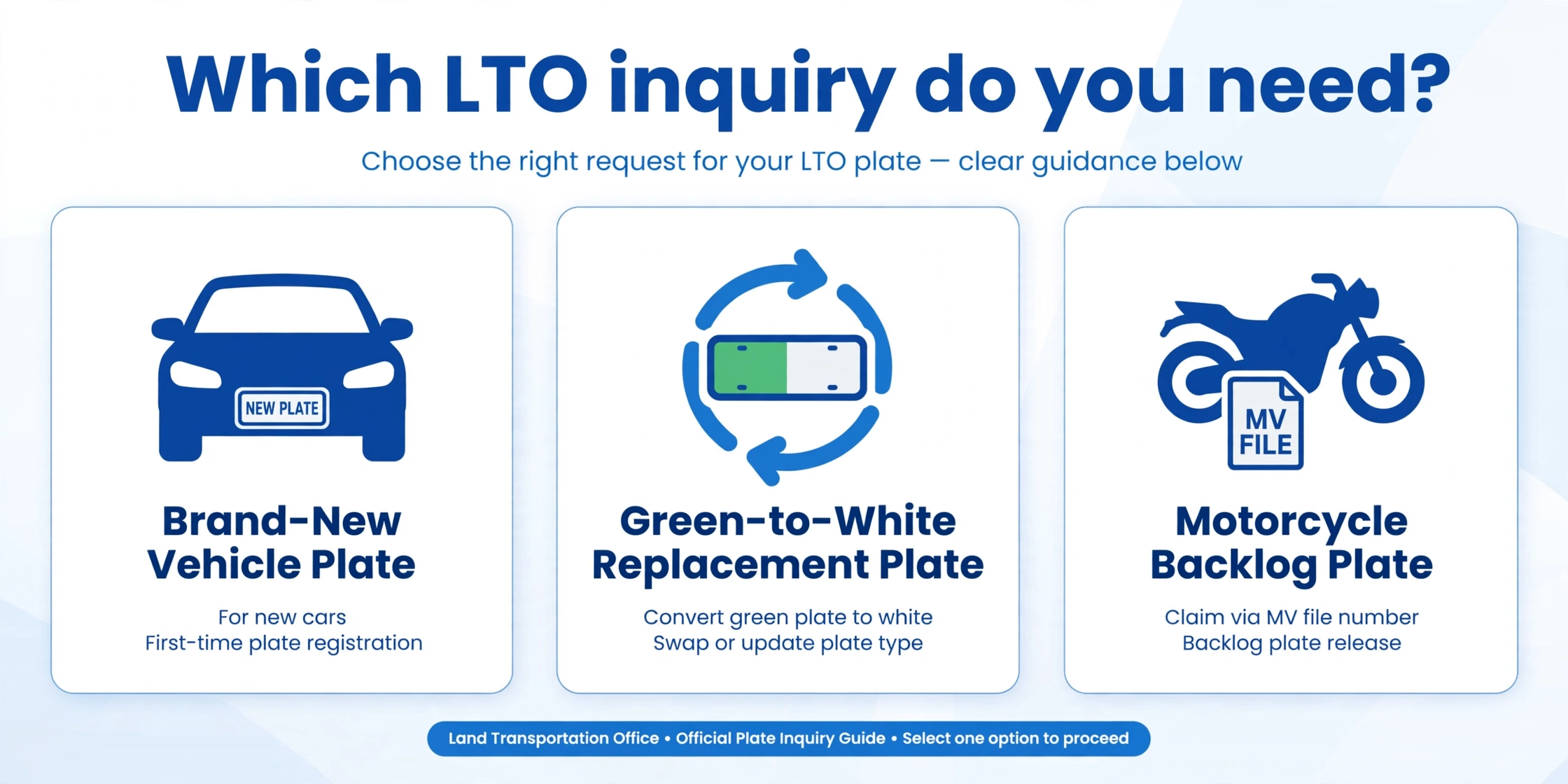
Using the wrong tool is the most common tracking mistake today. The selector below points you to the correct inquiry method. Pick the option that matches your vehicle situation right now.
Which LTO Inquiry Do You Need?
Pick your situation — get the right tool and the exact input format.
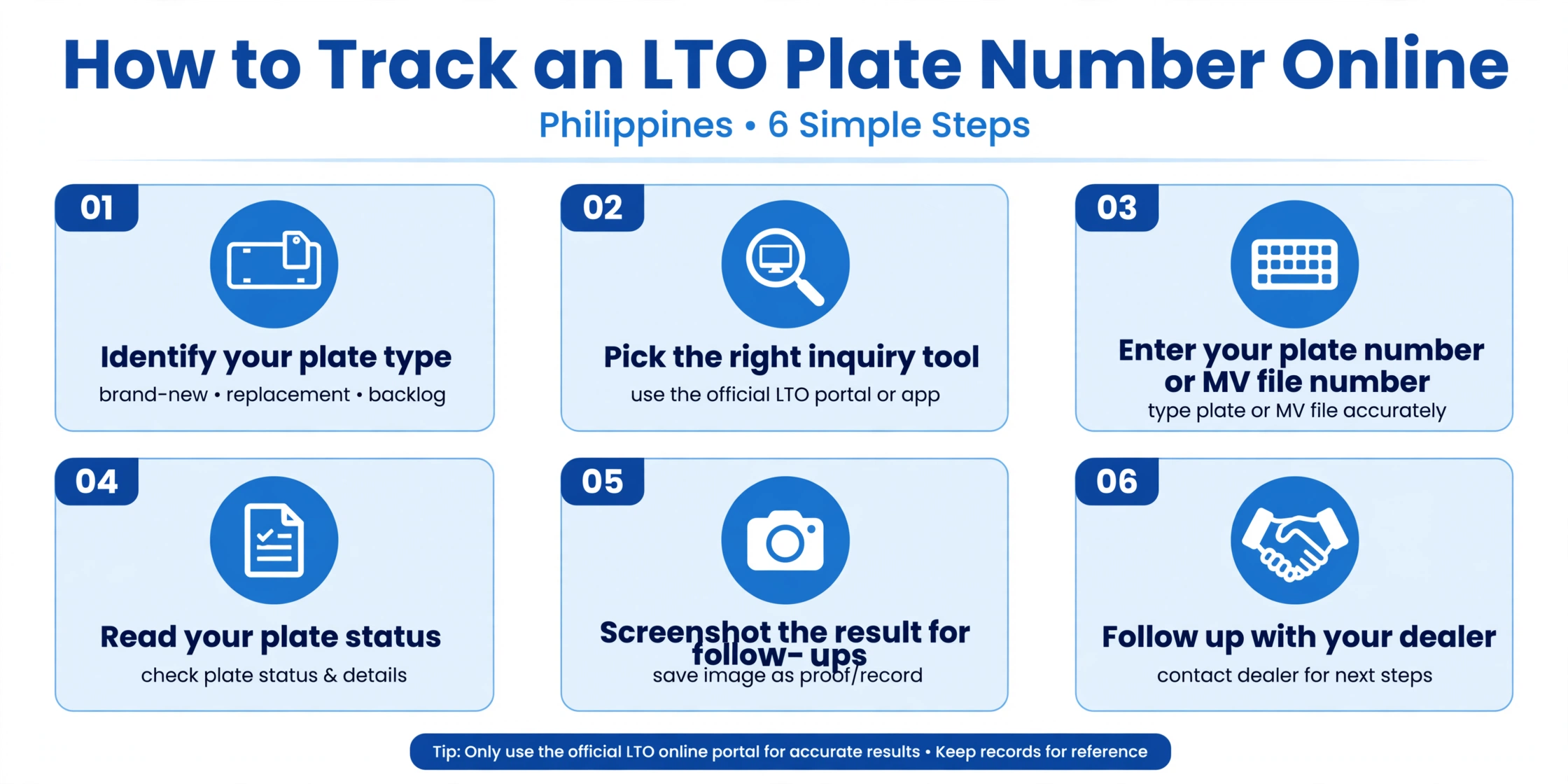
How to Check Your Plate Online: 6 Steps
Once you know the right tool, checking takes only a few minutes. Keep your CR nearby so you can copy details accurately. Follow these steps in order for the best possible results.
The MV File Zero-Strip Rule
Many motorcycle owners see a frustrating empty result when searching online. The cause is usually leading zeros printed on the OR and CR. The tracker input field does not accept those extra zeros at all.
Remove every zero between the dash and the first non-zero digit. Type the remaining digits exactly as shown in this simple example. This single fix resolves most failed MV file searches online.
As printed on your OR/CR | What to type in the tracker |
|---|---|
1301-00001002045 | 1301-1002045 |
1380-00000098234 | 1380-98234 |
Note
Some online trackers accept the number with the dash included today. Others want digits only, so try both formats if one fails.
Other Ways to Check Your Plate
The online tracker is convenient, but it is not your only option. These alternative methods work when the website is down or unreachable. Choose whichever method fits your situation and available resources today.
Check via SMS
LTO runs an SMS-based Mobile Query Facility for basic plate verification. Send a text in this exact format to the number 2600. Wait one to two minutes for the automated reply message.
SMS Format
Text LTO VEHICLE, followed by your plate number, to 2600.
The reply usually includes the plate details and any alarm flag. Each query usually costs around two pesos and fifty centavos. Without an assigned plate yet, text VEHICLE followed by your MV file number.
Check Through the LTMS Portal
The LTMS portal shows your complete vehicle record beyond plate status. Log in with your registered email or LTO client number. Open the vehicle section to see registration details and any apprehensions.
Ask Your Dealer
Dealers receive plate release notices directly from the LTO system. They often know your plate status before public tools update. Call your dealer’s releasing office if your tracker result looks unclear.
If the tracker shows Released but your dealer denies receiving anything, escalate calmly. Ask for the dealer’s head office or main branch contact. The plate may be sitting at a different branch location.
What Your Tracker Result Means
Tracker results use short status labels that confuse many first-time users. This table explains the most common labels in plain language. Match your own result to the correct row in the table below.
Status | What it means | What to do next |
|---|---|---|
Released | Plate sent to your dealer for claiming | Contact your dealer to arrange pickup soon |
Ready for pickup | Plate waiting at the assigned LTO office | Visit the office with your OR, CR, and ID |
In production | Plate being manufactured and not ready yet | Wait a few weeks, then check the tracker again |
Not found | No record matched your input in the database | Check your input format and try again later |
Getting Your Plate Delivered
Finding your plate in the tracker is only the first step. You still need to request delivery or visit for pickup. Never assume the plate will arrive automatically at your home.
Office-to-Office Transfer
LTO-NCR offers an office-to-office plate transfer service, according to published reports. This moves your plate to your chosen LTO office for pickup. It is not residential courier delivery to your home address.
Coverage Limits You Should Know
Online plate trackers do not cover every vehicle in the Philippines. Knowing these limits saves you from wasted searches and frustration. Here are the most important coverage facts you should always remember.
NCR Coverage
The online inquiry tools mainly cover vehicles registered under LTO NCR offices. Provincial registrations generally do not appear in these online databases. Contact your local LTO district office directly for provincial plate inquiries.
ltotracker.com Is Offline
The old ltotracker.com service went offline in January 2026, according to published reports. Avoid outdated guides that still link to that defunct website. Use current LTO-NCR inquiry pages or the LTMS portal instead.
eGovPH App
Plate tracking through the eGovPH app is currently unavailable, as widely reported. Do not rely on the app for plate status updates right now. Check the official web inquiry tools or contact your dealer.


5 Comments