LTO Plate Number Tracker: Check Your Plate Status & Delivery
In short: to track your LTO plate number, check your plate number or 15-digit MV file number on the official LTO channels, lto.gov.ph and the LTMS portal. The result tells you whether your plate is in process, ready for pickup, ready for delivery, dispatched, or released. This page explains each step and what every status means.
LTO Tracker PH is an independent guide, not a government website. We help car and motorcycle owners in the Philippines follow their plate number tracker status, find their MV file number, understand plate delivery and pickup, and avoid look-alike sites. Never share your passwords or ID photos with any site that claims to show your plate status.

Quick Tools
When Should You Renew?
Type your plate number — we’ll tell you your exact renewal month and week.
Pickup or Delivery?
Answer 3 quick questions — we’ll recommend the fastest way to get your plate.
Are You Ready?
Tick off each item — don’t head to the LTO (or book delivery) until you’re 5/5.
In short: TrackYourPlate helps Filipino vehicle owners check their LTO plate status, find their MV file number, track plate delivery, and renew registration — with step-by-step guides updated for 2026 and links to official LTO channels.
On this page
How the LTO Tracker Works
An “LTO tracker” is not a single gadget or download. It is simply any method of checking your plate number status against Land Transportation Office records — and the only records that count are the LTO’s own. When people search for “lto tracker” or “lto plate tracker”, they want one thing: a clear answer on where their plate is and when they can claim it.
Every genuine LTO plate number check online works the same way. You enter the detail that identifies your vehicle — your plate number if one has been assigned, or the 15-digit MV file number printed on your Certificate of Registration — and the official lookup returns the current status: still being processed, ready for pickup, or already released. Brand-new cars still running on a conduction sticker use the MV file number until a plate is assigned.
TrackYourPlate is an independent guide site. We do not access LTO records or process applications — we explain, step by step, how to run the official checks yourself, which documents to prepare, and what each status message means. Start with the Quick Tools box above for instant answers, then follow the guides below for the full walkthrough.
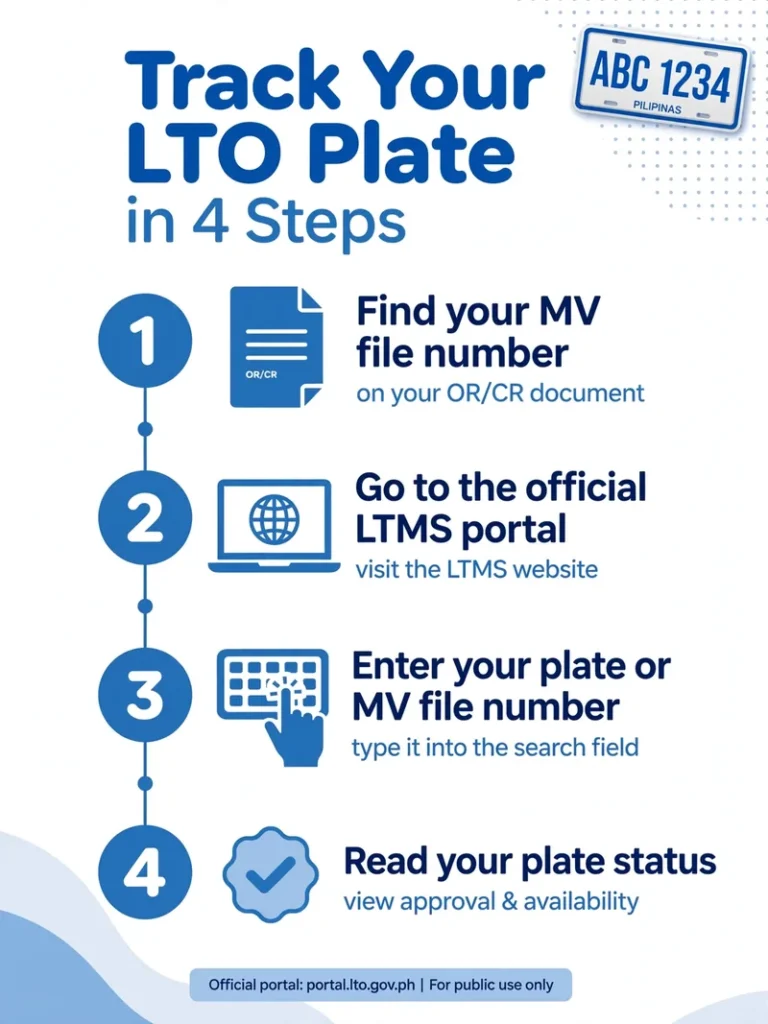
Check Your LTO Plate Number Online
You can run an LTO plate number check online in a few minutes. The whole process comes down to four steps:
Heads up
Because the LTMS portal is the system of record, no “plate number tracker” or “lto tracker plate number” page disconnected from it can show your real status. Stick to the official check — and be wary of any site that asks for payment or personal documents just to display a status.
Track Your Plate Number Delivery
Once your plate number status shows that your plate is ready, you have two choices: claim it in person at the LTO district office where your vehicle is registered, or request courier delivery through the official LTO channel. Delivery is never automatic, so confirm the plate is ready first. If your plate number has not been assigned yet, which is common for new motorcycles, use your 15-digit MV file number instead.
How plate delivery works, step by step
- Check your plate status using your plate number or MV file number.
- If the plate is ready, choose pickup at your LTO office or request delivery on the official LTO channel.
- Review the delivery fee shown before you pay.
- Keep your phone on and watch for the courier’s SMS and tracking number once the status shows Dispatched.
- When the plate arrives, compare it with your CR and contact your LTO office if anything does not match.
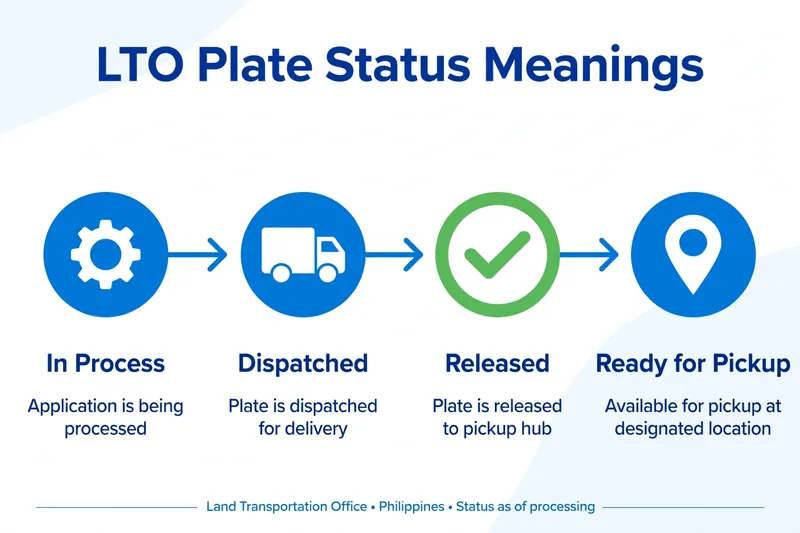
The statuses below are what you may see during these steps.
What each plate status means
When you run a check, you will see one of these statuses:
Delivery fees and what to prepare
Delivery is not free and not automatic. The courier fee depends on your location and the courier, and the exact amount is shown on the official LTO channel before you confirm payment. Check the fee there rather than relying on figures quoted by third-party sites. Keep your contact number active so the courier can reach you.
Have these ready: your Official Receipt (OR), Certificate of Registration (CR), and a valid ID. If someone else claims the plate for you, they need an authorization letter plus their own valid ID.
LTO Tracker App: What to Use in 2026
Is there an official LTO tracker app? No — the LTO has not released a standalone tracker app, and any third-party app claiming to check your plate status is not connected to LTO records. Never hand your personal details or OR/CR photos to an unofficial app.
The official digital channels are the LTMS portal at portal.lto.gov.ph and the eGovPH app, the government’s official super-app for public services. You can also verify a plate by SMS — text LTO VEHICLE [plate number] to 2600 — or visit your LTO district office in person with your OR and CR.
Plate Number vs MV File Number: Which Should You Use?
Your plate number (for example, ABC 1234) is the fastest reference once it has been assigned. Your MV file number is the 15-digit code the LTO assigns at first registration — find it on the top-left of your Certificate of Registration, or under “File Number” on your Official Receipt. When typing it into an online form, remove the zeros right after the dash: 1301-00001002045 becomes 1301-1002045.
Simple rule: use your plate number if you have one. Still waiting — for example, a new motorcycle with no plate on its CR, or a vehicle caught in the plate backlog? Use the MV file number instead.
📌 Key Takeaways
• Check plate status with your plate number or MV file number • Find your 15-digit MV file number on your CR • Track delivery or pick up at your LTO branch • Renew on schedule based on your plate’s last digit
Start With the Guide You Need
Every vehicle owner’s situation is a little different. Choose the guide that matches what you are trying to do right now — each one walks you through its topic from start to finish.
Check Your Plate Number Status
Follow the official tracker step by step to see whether your plate is still being processed, ready for pickup, or already released. Read the plate status guide.
Find Your MV File Number
Your MV File Number is the key detail most LTO lookups ask for. Learn where to find it on your Certificate of Registration and how to use it. Find your MV File Number.
Track Your Plate Delivery
Understand delivery timelines, courier arrangements, and fees so you always know when and how your plate will reach you. Read the delivery status guide.
Renew Your Vehicle Registration
Registration renewal has its own requirements and schedule. See which documents to prepare and how the process works. Read the renewal guide.
Understand Plate Formats and Coding
From the standard three-letter, four-number layout to number coding schedules, learn how Philippine plates are structured. Read the plate formats guide.
Why Vehicle Owners Use This Site
LTO Tracker PH is an independent website run by people who once found these same processes confusing and decided to document them properly. Our guides are free to read, written in plain language, and reviewed for accuracy before publication. We do not process applications or access LTO records — we simply explain, step by step, how you can handle things yourself.
Have These Ready Before You Begin
Most LTO lookups ask for the same handful of details. Gathering them before you start will save you time and repeated searches:
Common Questions
Ready When You Are
Your plate will not track itself. Choose the guide that matches your situation and get a clear answer in a few minutes.
More LTO Guides
Looking for something else? These step-by-step guides cover other common LTO questions for vehicle owners.
- LTO Plate Number Check: Four Reliable Ways to Verify Your Plate (2026) – Four reliable ways to verify your plate number.
- How to Find Your MV File Number on OR/CR (2026 Guide) – Where to find your MV file number on your OR or CR.
- LTMS Portal Guide: Registration, Login & Online Services (2026) – Registration, login and online services on the LTMS portal.
- LTO Plate Replacement Guide: Lost, Damaged & Green-to-White Plates (2026) – What to do with lost, damaged or old green plates.
- LTO Violation Check: How to Check LTO Alarms and Violations Online (2026) – How to check LTO alarms and violations online.
- LTO Hotline, Office Hours & Contact Guide (2026) – LTO hotline numbers and office hours.