
In short: An LTO alarm blocks your vehicle registration renewal until you clear it. You can check alarms and violations through the official LTMS portal. This guide shows the exact steps, requirements, and what to do next.
Key Takeaways
• Check alarms on the LTMS portal before every registration renewal transaction.
• An alarm means an unsettled apprehension tied to your vehicle record.
• Only the LTO office that issued it can lift the alarm.
• Bring your OR, CR, valid ID, and settlement receipts when clearing.
• Never pay fixers; settle violations only through official LTO channels.
October 2026 Update: LTO Memo on Pedestrian Cases
Memorandum No. MVL-2026-229 lets LTO pursue license revocation against motorists who endanger pedestrians.
Legal basis: RA 4136 Section 27(a), “Improper Person to Operate a Motor Vehicle.”
Revocation is not automatic — LTO must investigate and observe due process first.
It covers designated pedestrian crossings — protecting children, seniors, PWDs, and road workers.
An “improper person” case can also put your vehicle under LTO alarm status.
What Is an LTO Alarm?
An LTO alarm is a flag on your vehicle’s official record. It appears after an apprehension, unpaid fine, or pending case. Once flagged, you cannot complete your registration renewal until settlement is complete.
Alarms differ from ordinary violations in one very important way. A violation is the offense itself, while an alarm blocks transactions. Think of the alarm as a hold order on your vehicle record.
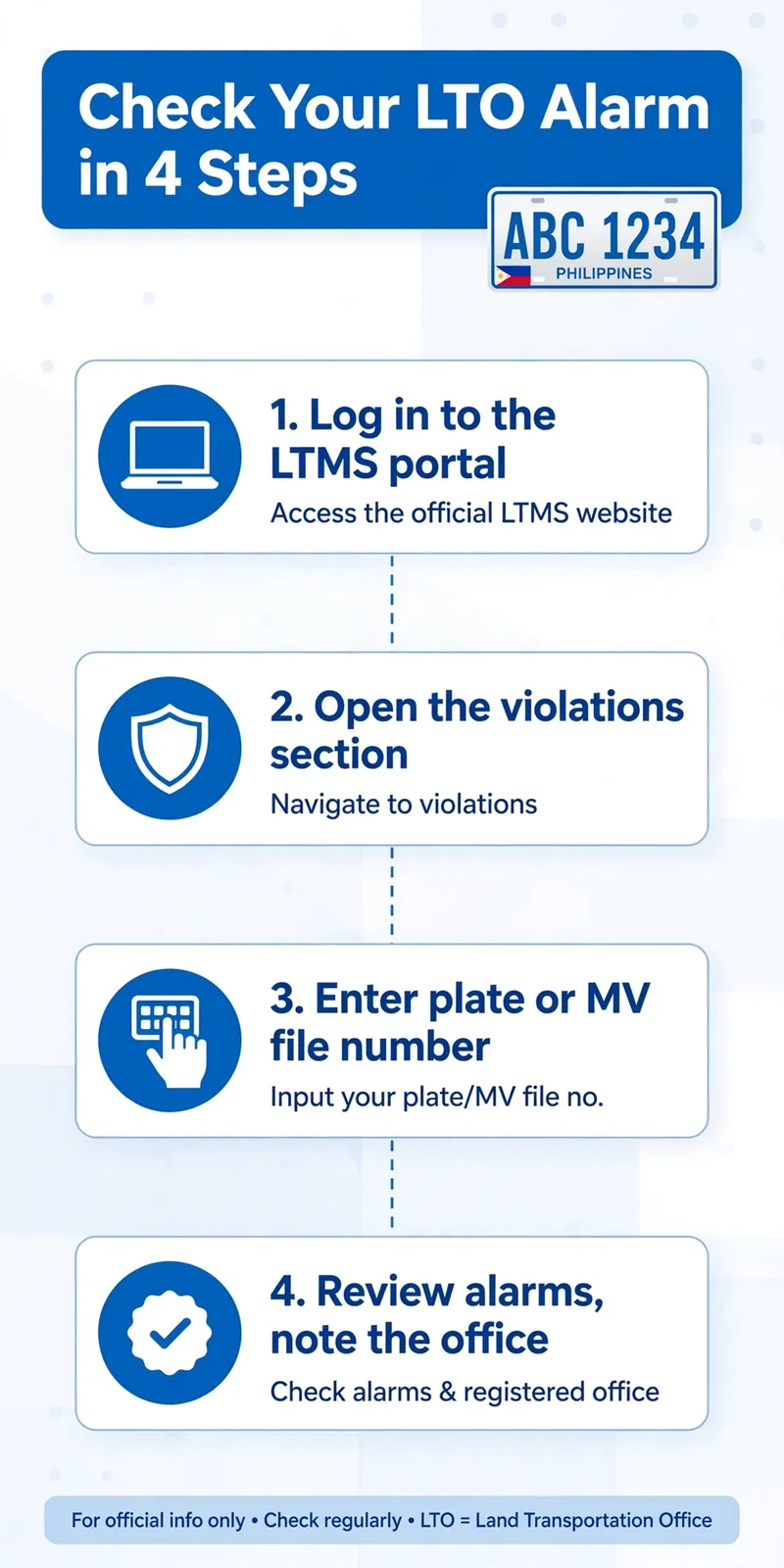
How to Check LTO Violations Online
The official way to check is through the LTMS portal. You need an LTMS account linked to your vehicle records.
Note
A clear result today does not guarantee zero violations tomorrow. Records update only after LTO personnel encode new apprehension reports.
Check Violations on the LTMS Portal
The LTMS portal is the LTO’s official online transaction system. It replaced many walk-in queries with much faster digital services. Registration for new accounts is free and takes a few minutes.
If you bought a second-hand vehicle, check its alarm status first. Unsettled alarms from the previous owner can block your own renewal. Always verify the alarm status before paying for any used vehicle.
Alarm vs Violation: Key Differences
People often confuse alarms with violations, so here is clarity.
| Alarm | Violation | |
|---|---|---|
| What it is | A hold order on your vehicle record | The traffic offense itself |
| Effect | Blocks renewal and other transactions | Recorded; may trigger an alarm later |
| Cleared by | The issuing LTO office only | Settlement or payment process |
| Where to check | LTMS portal alarm section | LTMS portal violations section |
What to Do If You Have an Alarm
If you found an alarm on your record, follow these steps calmly. Rushing to fixers only creates bigger and more expensive problems.
Alarm Clearance Checklist
Tick each step as you finish it — your progress saves below.
Common LTO Violations to Avoid
Knowing common violations helps you avoid future alarms and penalties.
- Driving without a valid license is one of the costliest common violations.
- Using public roads with expired registration quickly triggers apprehension reports.
- Reckless driving endangers everyone and carries very heavy penalties today.
- Missing plates or conduction stickers attract immediate roadside attention daily.
Fine amounts change often, so confirm current fines on the LTMS portal.
Frequently Asked Questions
Check your alarms today and drive with complete peace of mind.



3 Comments